The books below (both print and electronic) are relevant to SOCW251 and available at APU - many are taken from the syllabi. For other books in your syllabus, check LINK+.
 Christianity and Social Work: Readings on the Integration of Christian Faith and Social Work Practice
by
Christianity and Social Work: Readings on the Integration of Christian Faith and Social Work Practice
by
 Families on the Fault Line: America's Working Class Speaks About the Family, the Economy, Race, and Ethnicity
by
Families on the Fault Line: America's Working Class Speaks About the Family, the Economy, Race, and Ethnicity
by
 Flat Broke with Children: Women in the Age of Welfare Reform
by
Flat Broke with Children: Women in the Age of Welfare Reform
by
 God's Politics: Why the Right Gets it Wrong and the Left Doesn't Get It
by
Losing Ground: American Social Policy, 1950-1980
by
God's Politics: Why the Right Gets it Wrong and the Left Doesn't Get It
by
Losing Ground: American Social Policy, 1950-1980
by
 Sex Offender Laws: Failed Policies, New Directions
by
Sex Offender Laws: Failed Policies, New Directions
by
 The Shame of the Nation: The Restoration of Apartheid Schooling in America
by
The Shame of the Nation: The Restoration of Apartheid Schooling in America
by
 Sheila's Shop: Working-class African American Women Talk About Life, Love, Race, and Hair
by
Sheila's Shop: Working-class African American Women Talk About Life, Love, Race, and Hair
by
 Social Statistics: An Introduction Using SPSS for Windows
by
Social Statistics: An Introduction Using SPSS for Windows
by
 Social Welfare: A History of the American Response to Need
by
Social Welfare: A History of the American Response to Need
by
 Social Work with Immigrants and Refugees: Legal Issues, Clinical Skills, and Advocacy
by
Social Work with Immigrants and Refugees: Legal Issues, Clinical Skills, and Advocacy
by
 Successful Grant Writing
by
Successful Grant Writing
by
 Urban Social Work: An Introduction to Policy and Practice in the Cities
by
Urban Social Work: An Introduction to Policy and Practice in the Cities
by
 Why Men Earn More: The Startling Truth Behind the Pay Gap and What Women Can Do About It
by
Why Men Earn More: The Startling Truth Behind the Pay Gap and What Women Can Do About It
by
To find library resources on your topic, follow the steps below.
Step One: Go to the Basic Search in the APU catalog, and enter one or two terms, or a phrase (see below). Select 'Subject' from the drop-down menu on the left (see graphic below), and click 'Submit.' If your terms are recognized subjects, the catalog will take you to a subject list. If this is the case, go to step five and continue.

Step Two: If after doing a subject search, you get the message 'No subjects found; nearby subjects are:' under the search box, then click on the 'New Search' link in the upper right corner, and make sure the drop-down menu to the left of the search box is set on 'Keyword.' Click 'Submit' and follow the rest of the steps below.

Step Three: Skim through your results and look for a book that seems relevant to your topic. Click on the title of the book so that you can see the full record.
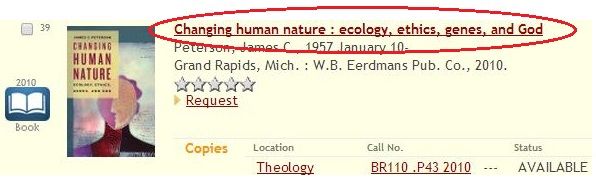
Step Four: Look in the 'Subject' section, and click on any subject that has something to do with your topic. If there are no relevant subjects, go back to your original results list and repeat step three.
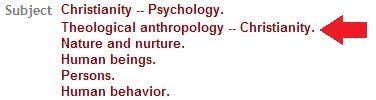
Step Five: When you click on a subject link, you should be taken to a list of subjects where you can either choose the same subject, or choose a different one. Click on the subject link of choice. You can see the number of items for each subject off to the right. Clicking on the subject link will give you the list of titles for that subject (in the graphic below, you will get a list of 136 titles for the subject 'theological anthropology - christianity').
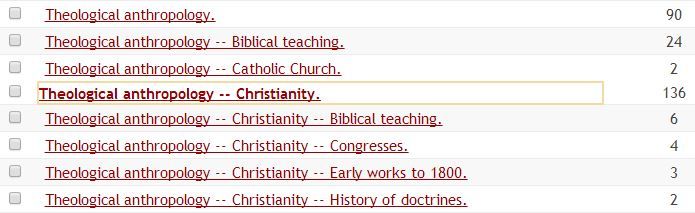
Step Six: After clicking on the subject link to get the title list, click on the first title link at the top of your new results list (in the example above, all your results will have 'theological anthropology - christianity' as a subject, as well as other subjects that could be useful). Go through this list by using the 'Previous record' and 'Next record' links in the upper right of the screen. You are trying to identify other subjects that are related to your topic. Once you find another subject of interest, click on the link for a new list of titles. You can repeat steps four and five until you feel that you've exhausted the relevant subjects used in the catalog.

TIPS:
APU Libraries has a variety of ebooks on through two main vendors: Ebrary and EBSCO eBook Collection. To find ebooks on the topics that you see in the Searches To Get You Started box below, follow these instructions:
For information on using ebooks in the Ebrary and EBSCO eBook Collection environments, use the following guide:
Search Strategies:

Search Tip:
While the most current information for these issues will be found in the journal article databases or on the Internet, books can provide valuable background information to help you understand the issue more fully. Click on the links below to find library resources on topics related to the following issues. Be sure to also click on the red LINK+ button to the right of your results to get even more resources.


